

Client Portal – Gaia
Your clients and your managers access their portfolios online.
A web portal plugged directly into Gaia: your clients see exactly what your team sees.
- Investorsview, place orders, keep their file up to date
- Fund subscriberssubscribe, redeem, follow their units
- Managers and EAMsfollow all their clients with one login
- Your whole portfolio at a glance : Portfolio value, cash, cash available to trade and unrealised gains, as soon as the client logs in.
- Prices update live : Prices, values and gains refresh on their own, without reloading the page.
- Place an order in a few clicks : Straight from a position: buy or sell, order type, limit price and quantity.
- Checked before it is sent : Eligibility, blackout period, short selling: the rules are shown on the ticket and enforced by the server.
- See where the money is : Breakdown by asset class, currency and sector, in one screen.
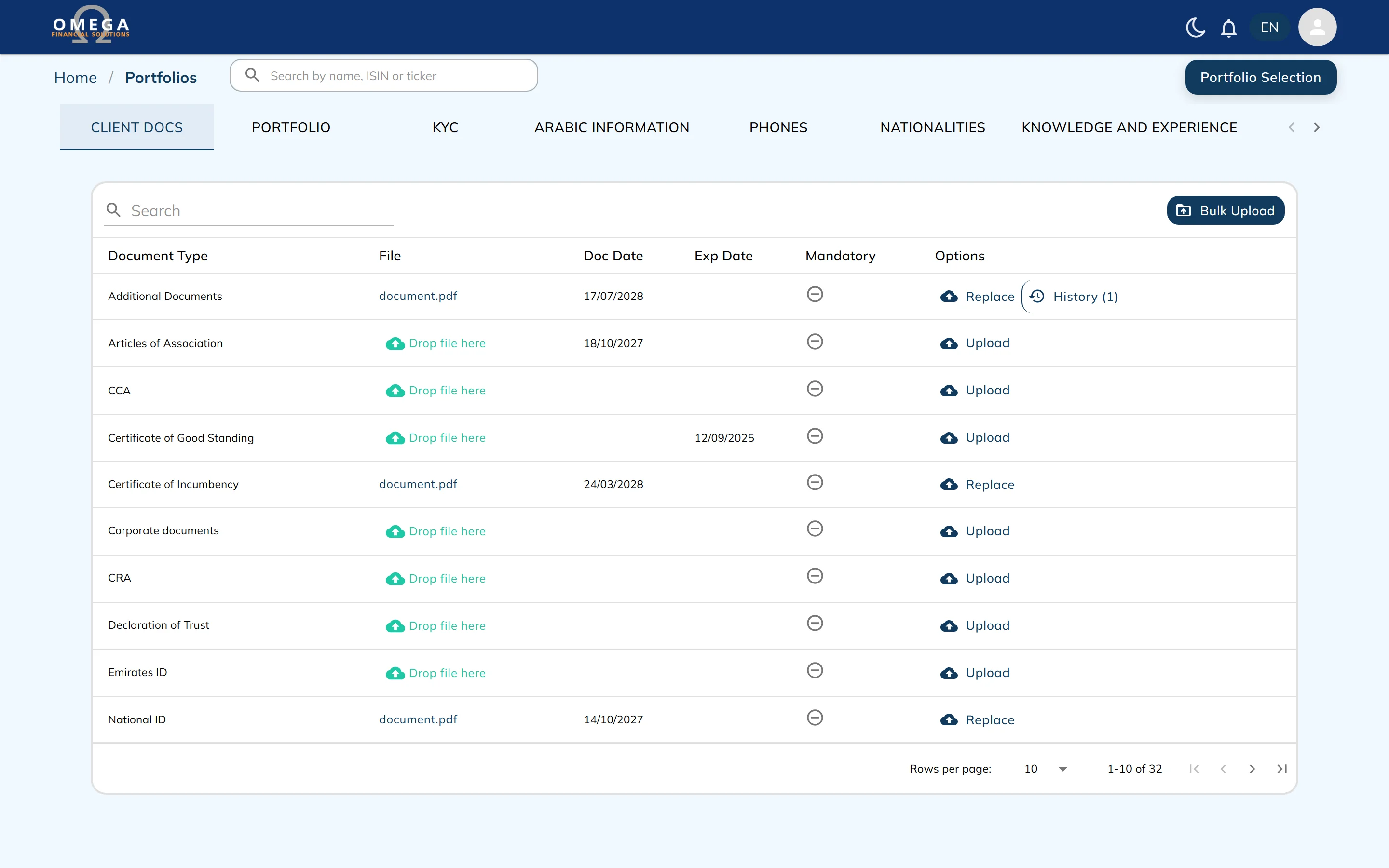
- The client file, always up to date : Client documents with their expiry date and version history.
- On computer, tablet or phone : The same portal and the same figures, wherever the client is.

Gaia Client Portal
Your clients see exactly what your team sees: portfolio, live prices, orders checked before they are sent, analysis.
Request a demo
Demo data.
The same figures as your team
- One database
- No copy
- Live updates
A clear view of the portfolio
- Dashboard
- Breakdown by asset
- Consolidated view
- Schedule
- Watch list
Orders checked before they are sent
- Rules shown on the ticket
- Server-side checks
- Search by ISIN
- Transfers between accounts
Fund subscriptions and redemptions
- Subscriptions
- Redemptions
- Subscriber statements
Account opening and client file
- Online account opening
- KYC file
- Documents and expiry
- Statements on demand
Security
- Two-factor authentication
- Full audit trail
- Dedicated installation
French, English and Arabic
- French
- English
- Arabic
- Mobile
- Dark mode
See more features
The same figures as your team
- The portal reads Gaia's database directly: no copy, no recalculation.
- Every client instruction (order, cash movement, document) goes back into Gaia and through the same checks as your team's work.
- Prices and portfolio value update live, without refreshing the page.
A clear view of the portfolio
- Dashboard: portfolio value, unrealised gains, cash and cash available to trade.
- Breakdown by asset class, currency and sector.
- Consolidated view of several portfolios, or by strategy.
- Positions, accounts, transactions, orders and performance.
- Schedule of coupons, dividends and redemptions, and corporate action notices.
- Watch list with price, change and chart.
Orders checked before they are sent
- Search for a security by name, ISIN or ticker, within the universe you open to the client.
- Orders placed from the “New order” button, from a position or from the watch list.
- Compliance rules are shown on the ticket before sending: eligibility, blackout periods, short selling, buying power, available cash, management constraints.
- Checks are enforced by the server when the order is placed: the screen cannot bypass them.
- Transfers between the client's accounts, with a balance check.
Fund subscriptions and redemptions
- Subscribers place their subscriptions and redemptions online, on the funds and share classes you open to them.
- They follow their units, their movements and their subscriber statements.
Account opening and client file
- Guided account opening for a new investor, adapted to your institution's approval workflow.
- Clients update their own file: knowledge and experience, tax residences, insider declarations.
- Client documents with their expiry date and version history.
- Statements generated on demand, and statements sent automatically by your institution, all in one place.
Security
- The browser never accesses the database directly: every request goes through a secure interface that checks permissions.
- Two-factor authentication by e-mail, SMS or authenticator app.
- Lock-out after several failed logins, and protected sessions.
- Full audit trail of access and actions, including refused attempts.
- A dedicated installation for each institution, on your servers or in the cloud: no data shared with another institution.
French, English and Arabic
- Interface in French, English and Arabic, fully right-to-left in Arabic.
- Light or dark mode.
- Works on phones and tablets, with the same screens as on a computer.
Frequently asked questions
Is the portal separate software from Gaia?
No. It uses the same database as Gaia. Positions, orders and documents are those your team sees, in real time.
Are orders placed on the portal checked?
Yes. Gaia's compliance rules apply before every order is sent, exactly as for an order entered by a manager.
Can a new investor open an account online?
Yes. The portal offers a guided account opening, adapted to your institution's approval workflow.
In which languages is the portal available?
French, English and Arabic, with a right-to-left layout in Arabic.
Want to see Gaia in action? Let’s talk.Request a demo
Our Solution, Gaia
Gaia is a cost-effective comprehensive front-to-back portfolio management solution, designed for the asset management profession. It is a customizable modular solution. A suite of modules and features complete the Core, allowing a natural seamless extension reaching a fully functional coverage for the acquiring institution.
Get to know Gaia

Portfolio Management System
A centralised, customisable screen, multi-asset and multi-currency.


Order Management System
Create, rebalance and send your orders, including via FIX.


Risk & Compliance
Regulatory and management constraints, checked ex-ante and ex-post.


Performance & Simulations
Performance, contribution, attribution and simulation scenarios.


Backoffice and Custody
Fees, SWIFT messages and bulk corporate actions.


Cash & Collateral
Repos, collateral and margin calls monitored automatically.


Reporting Toolbox
Automated reports, Excel and PDF exports, open SQL database.

Connectivity
SWIFT, FIX, web services: Gaia fits into your IT system.


Client Portal
Your clients follow their portfolios and place orders online.


Client Onboarding & KYC
Account opening, risk profile, documents and relationship follow-up.
See Gaia on your own use cases.Request a demo
Who is it for?
- Fund ManagerGaia covers everything that is needed to efficiently and conveniently manage a fund. Here are some of the key functionalities of Gaia.
- Discretionary Portfolio ManagerGaia puts at your disposal all the tools needed to efficiently handle your clients' portfolios, define workflows and automatically check constraints and communicate with your clients.
- BrokerGaia puts at your disposal all the tools needed to efficiently monitor your clients' portfolios, define workflows and constraints by client and automatically communicate with your clients.
- Family OfficeEverything you need to incorporate and monitor your investment strategies, and efficiently and automatically communicate investments and performances.
Request a demo of Gaia
Tell us briefly who you are: we will get back to you to arrange a demonstration of Gaia tailored to your business.